-
Tiny tunes app android
Tiny Tunes is a free music player and downloader app for Android devices. It allows you to search and download songs from the internet and create playlists to play your music. You can also stream music online and listen to radio stations. The app has a simple and easy-to-use interface, and it supports various audio formats such as MP3, WAV, and M4A. You can use Tiny Tunes to discover new music and artists, or to listen to your favorite songs on the go.
Where download tiny tunes app for android

You can download Tiny Tunes for Android from the Google Play Store. Here are the steps:
- Open the Google Play Store app on your Android device.
- In the search bar, type “Tiny Tunes” and press Enter.
- Select the app from the search results.
- Tap the “Install” button to begin the download process.
- Wait for the download and installation process to complete.
- Once the app is installed, you can launch it from the app drawer on your device.
- In your browser, download the TinyTunes .APK file here: TinyTunes 1.16.2 APK Download
Alternatively, you can also download the Tiny Tunes APK file from a third-party website and install it manually on your device. However, it’s important to be careful when downloading apps from external sources, as they may contain malware or other malicious software.
-
Android TV. Which browser is better?

Android TV. Which browser is better? The Android TV platform is not only an excellent operating system for watching movies, but also for surfing the Internet. Think about it: just connect speakers, a mouse and a keyboard to your TV, after which you can use it as a real computer! However, one of the main functions of a PC is to surf the Internet, but the browser for Android TV still has to be downloaded separately. It may seem that you can get by with the usual Google Chrome, at the same time syncing all your bookmarks and passwords, but it does not work as perfectly as on a smartphone or tablet. Let’s check which browser to choose for Android TV. There is something to think about here.
Content:
- 1.Google Chrome for Android TV
- 2.Firefox for Android TV
- 3.Good browser for Android TV
Please note that not all apps are available on Google Play on Android TV. I’ll leave links to third party apps, but you can download them yourself if you don’t trust the source!
1.Google Chrome for Android TV
Google Chrome for Android TV
Interestingly, Google Chrome is not preinstalled on Android TV, although the developer is the same company. For unknown reasons, the browser is not adapted to work on a TV, and it is not yet available in the Android TV app store, but you can download the APK file and install it using our instructions.
In general, the browser works well, but you need to be prepared for the fact that it does not support some remotes – you will have to use the mouse. All the functions of Google Chrome from a smartphone are also available on the TV, but keep in mind that it does not work as fast. If the phone is dead, and the laptop is somewhere far away, then Google Chrome on the TV is quite suitable for checking mail or news, but nothing more. There are better options.
2.Firefox for Android TV
The Mozilla browser does not have a version for Android TV, but you can still safely download it to your TV. Of course, the application is not on Google Play, but already due to certain requirements of Google regarding applications for Android TV. The main feature is the support for extensions: many of them work without any problems.

Personally, I also noticed that the web version of YouTube in the browser runs smoother and faster than in a standalone application, but it is a little more difficult to do this due to the remote control features. Tabs open quickly, there are no freezes when minimizing, but the interface shows that Firefox works well on Android TV.
3.Good browser for Android TV
It may seem that there are simply no normal browsers for Android TV, but this is not so: the forums advise you to try Puffin TV. I downloaded it and did not regret it: yes, it looks a little old-fashioned and does not look like other browsers, but at the same time it works very quickly and easily. If Chrome minimizes and reopens hard enough, Puffin TV does it with ease.
One of the advantages is that it is optimized specifically for Android TV, so it works with any remote control. Plays music and videos seamlessly with cloud rendering, allows you to transfer bookmarks to your TV using a QR code, and displays web pages while maintaining formatting. It is convenient that it is available on Google Play on the TV – you can always download it!
Thank you for attention!
-
There are many Android apps that can be helpful for learning

There are many Android apps that can be helpful for learning. Here are a few that you might find useful:
Duolingo – is a popular language learning app that is available for Android and other platforms. It offers courses in a variety of languages, including Spanish, French, German, Italian, and many more. The app uses a variety of techniques, including games and interactive exercises, to help you learn a new language. It’s a great resource for anyone who is looking to learn a new language or improve their language skills. Duolingo is free to use, although there are some optional in-app purchases that you can make if you want to unlock additional features.
Khan Academy is a non-profit educational organization that provides a variety of online resources, including a library of educational videos, to help students learn about a wide range of subjects. The Khan Academy app is available for Android and other platforms, and it provides access to many of the resources available on the Khan Academy website. You can use the app to learn about subjects such as math, science, economics, and more. The app is free to use and does not contain any ads or in-app purchases. It is a great resource for anyone looking to learn new things or to supplement their traditional education.
Coursera is an online platform that offers courses from top universities and educational institutions around the world. The Coursera app, which is available for Android and other platforms, allows you to access these courses from your mobile device. You can use the app to take courses in a variety of subjects, including computer science, business, and more. Many of the courses on Coursera are free to audit, but if you want to earn a certificate or receive other perks, you may need to pay a fee. The app is a great resource for anyone who wants to learn new things or further their education.
Quizlet is a study app that allows you to create and study flashcards on a variety of topics. It is available for Android and other platforms. You can use the app to create your own flashcards or access a library of flashcards that have been created by other users. In addition to flashcards, Quizlet also offers other study tools, such as quizzes and games, to help you learn. You can use the app to study for exams, learn a new language, or just improve your knowledge on a particular topic. Quizlet is free to use, although there are some optional in-app purchases that you can make if you want to unlock additional features.
TED is a non-profit organization that is known for its TED Talks, which are short, educational videos on a variety of topics. The TED app, which is available for Android and other platforms, provides access to a large library of TED Talks. You can use the app to watch talks on a wide range of subjects, including science, technology, business, and more. The app is free to use and does not contain any ads. It is a great resource for anyone who wants to learn new things or be inspired by new ideas.
These are just a few examples, but there are many other great apps out there that can help you learn new things.
-
Custom Essay Writing

There are many essay writing services that you can use to get help with your writing. These services can provide you with custom essays that are written specifically for you, based on the specific requirements of your assignment. If you are having difficulty writing an essay, or if you just don’t have the time to do it yourself, an essay writing service can help. Some services offer a variety of essay writing options, including editing, proofreading, and formatting, in addition to writing. It is important to carefully research and choose a reputable essay writing service to ensure that you receive high-quality work.
Professional Writers
Professional writers are individuals who have the skills and expertise to produce high-quality written content for a variety of purposes. They may work as freelance writers, or they may be employed by companies or organizations to write marketing materials, news articles, reports, or other types of written content. Professional writers are often highly educated, with degrees in fields such as English, journalism, or communications. They may also have specialized training or experience in a particular subject area, such as business or technical writing. Professional writers are able to produce well-written, accurate, and engaging content that meets the needs of their clients or audience.
Here are a few things to consider when looking for a top-quality essay writing service:
- Experience: Look for a service with a long track record of success and satisfied customers.
- Expertise: Choose a service that has writers with advanced degrees and experience in your field of study.
- Customer service: Make sure the service has responsive and helpful customer support.
- Prices: Consider the price of the service, but also remember that the cheapest option may not always be the best.
- Reputation: Read reviews and testimonials from past customers to get a sense of the service’s reputation.
By considering these factors, you can increase your chances of finding a top-quality essay writing service that will help you achieve the academic results you want.
-
Reface app

ReFace is a mobile app that uses artificial intelligence to swap the face of a person in a video with the face of someone else. The app allows users to create videos in which they appear to be singing or dancing along with their favorite celebrities, or to place their face onto the body of a character in a movie or TV show. The app has gained popularity due to its ability to create realistic face swaps and its ease of use.
Some of the main features of the ReFace app include:
- Face swap: This is the main feature of the app, which allows users to swap the faces of people in a video with their own face or the face of someone else. The app uses artificial intelligence to align the faces and create a realistic swap.
- Lip sync: The app allows users to lip sync to their favorite songs or dialogue from movies and TV shows.
- Celebrity face swap: Users can swap their face with the face of a celebrity and create videos in which they appear to be singing or dancing along with the celebrity.
- Movie and TV show scenes: Users can place their face onto the body of a character in a movie or TV show scene, creating videos that look like they are actually a part of the scene.
- Stickers and filters: The app offers a range of stickers and filters that users can apply to their videos to add some extra flair.
- Sharing: Users can share their created videos on social media platforms or save them to their device.
The ReFace app can be a fun and entertaining way to create unique videos and share them with friends and family. Some benefits of the app include:
- Ease of use: The app is easy to use, with a simple interface and clear instructions. Users can create and edit their videos with just a few taps.
- Realistic face swaps: The app uses artificial intelligence to create realistic face swaps, making it easy to create videos that look like the real thing.
- Wide range of options: The app offers a wide range of options for face swaps, including celebrities, movie and TV show characters, and the ability to use your own face or the face of someone else.
- Fun and entertaining: The app allows users to create videos that are both fun and entertaining, whether they are lip syncing to their favorite songs or placing their face onto the body of a character in a movie or TV show.
- Social sharing: Users can share their created videos on social media platforms, making it easy to share with friends and family.
-
Snapchat

Snapchat is a multimedia messaging app that allows users to send photos, videos, and messages to their friends. It is known for its features that allow users to apply filters, lenses, and effects to their photos and videos, as well as for its “Stories” feature, which allows users to post photos and videos that disappear after 24 hours. The app is popular with teenagers and young adults, and is available on both iOS and Android devices.
Some of the main features of the app include:
- Chat: Users can send text messages, photos, and videos to their friends on Snapchat.
- Lenses and Filters: Snapchat allows users to apply filters and lenses to their photos and videos. These can change the appearance of the photo or video, add text or emojis, or transform the user’s face into something else.
- Stories: Users can create a “Story” by posting a series of photos or videos that can be viewed by their friends for 24 hours.
- Discover: This feature allows users to find content from a variety of publishers, such as news organizations, celebrities, and other users.
- Snap Map: This feature shows the user’s location on a map and allows them to see where their friends are located.
- Bitmoji: Snapchat has a feature called Bitmoji that allows users to create their own personalized emojis. These emojis can be used in messages and added to photos and videos.
Snapchat is a popular app among teenagers and young adults because it allows them to communicate with their friends in a fun and creative way. Some of the benefits of Snapchat include:
- Easy to use: Snapchat has a simple user interface that is easy to navigate, making it accessible to users of all ages.
- Fun filters and lenses: Snapchat’s filters and lenses are a popular feature of the app. They allow users to transform their appearance and add effects to their photos and videos, which can be a lot of fun.
- Ephemeral messaging: One of the unique features of Snapchat is that messages and Stories disappear after a certain period of time, typically 24 hours. This can make users feel more comfortable sharing personal or sensitive information because it is not saved indefinitely.
- Connect with friends: Snapchat is a great way to stay in touch with friends and see what they are up to. The app’s chat, Story, and map features make it easy to connect with friends and see what they are doing.
- Discover new content: The Discover feature of Snapchat allows users to find and view content from a variety of sources, including news organizations, celebrities, and other users. This can be a great way to stay up to date on current events and discover new content.
-
YouCut Video Editor

YouCut is a free video editor and video maker for YouTube, Instagram, Tik Tok and other social media platforms. It allows you to trim and cut video, add music and text, apply filters, and more. You can use it to create and edit videos for personal or professional use. It is available for download on Android devices from the Google Play Store.
Here is an overview of some of the features and functions of YouCut Video Editor:
- Trim and cut video: You can select a portion of a video and remove the rest, or split a video into multiple segments and delete the ones you don’t want.
- Add music and text: You can add your own music or choose from a library of songs, and you can also add text overlays to your video.
- Apply filters: YouCut includes a variety of filters that you can use to change the look and feel of your video, including options for color correction, beauty, and more.
- Reverse video: You can reverse the direction of your video, which can create some interesting effects.
- Merge videos: You can combine multiple videos into a single file.
- Share on social media: YouCut allows you to share your edited videos directly to YouTube, Instagram, TikTok, and other social media platforms.
There are several benefits to using YouCut Video Editor:
- It’s free: YouCut is a free app, which means you don’t have to pay to use it.
- It’s easy to use: YouCut has a user-friendly interface that is easy to navigate, even if you’re new to video editing.
- It has a wide range of features: YouCut offers a variety of features that allow you to trim and cut video, add music and text, apply filters, and more.
- It’s convenient: You can use YouCut on your Android device, which means you can edit and create videos wherever you are.
- It’s fast: YouCut is designed to be fast and efficient, so you can edit your videos quickly and get them uploaded to social media platforms in no time.
-
Music Players for Android

Dub Music Player

Dub Music Player is a music player for Android devices that allows users to play and organize their music collection. Some features of Dub Music Player include:
- Support for a variety of audio file formats, including MP3, WAV, and FLAC
- A built-in equalizer with customizable settings
- The ability to create and edit playlists
- Folder browsing for organizing and finding music
- Lyrics support for singing along to your favorite songs
- A sleek, intuitive user interface for easy navigation
Overall, Dub Music Player is a feature-rich music player that provides a convenient way to listen to your music on an Android device.
Music Online app for Android
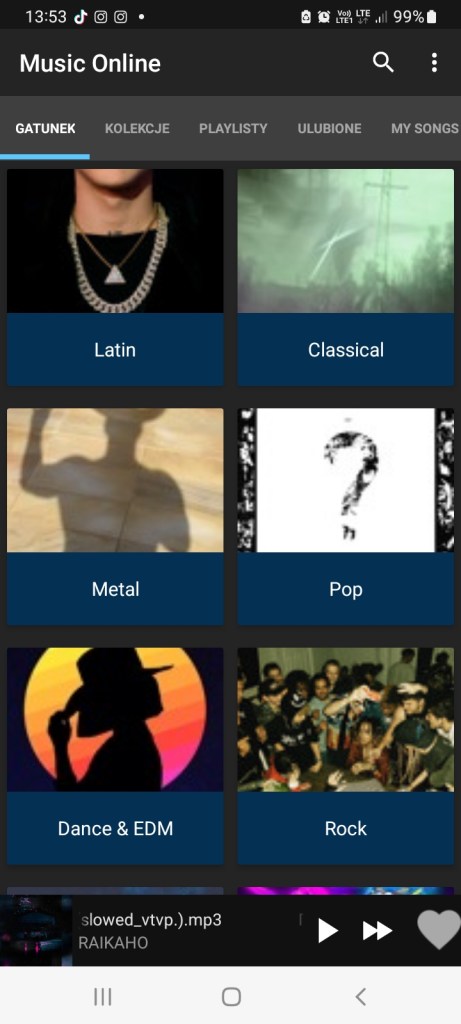
Music Online is a streaming music app for Android devices that allows users to listen to music from a variety of sources, including online radio stations and their own music library. Some features of Music Online include:
- A large selection of online radio stations covering various genres of music
- The ability to create and customize playlists
- Support for playback of a variety of audio file formats, including MP3, WAV, and FLAC
- A built-in equalizer with customizable settings
- The ability to download songs for offline listening
- Integration with popular music streaming services like Spotify and Apple Music
Overall, Music Online is a convenient app for listening to music on an Android device, whether you want to stream online radio or listen to your own music library.
-
How to determine the quality of a site?

There are several factors that can help you determine the quality of a website:
- Content: Is the information on the site accurate, well-written, and useful?
- Design: Is the site well-designed and easy to navigate?
- Functionality: Does the site work properly and load quickly?
- Authority: Is the site reliable and trustworthy? One way to gauge authority is to see if the site has any citations or links from reputable sources.
- User experience: Is the site user-friendly and enjoyable to use?
Evaluating these factors can help you determine the overall quality of a website.
Here are a few tools you can use to check the quality of a website:
- Google PageSpeed Insights: This tool analyzes the performance of a website and provides recommendations for improving its speed.
- SEOptimer: This tool checks a website for various on-page SEO issues and provides recommendations for improvement.
- W3C Markup Validation Service: This tool checks the HTML and CSS of a website for conformance to standards.
- Moz Domain Authority Checker: This tool checks the authority of a website based on various factors, such as its backlink profile and the quality of its content.
- Copyscape: This tool checks a website for plagiarized content.
These tools can help you identify problems with a website and determine its overall quality.
How to check the domain registration expiration date of a third-party site?
To check the domain registration expiration date of a third-party site, you can use the WHOIS lookup tool provided by ICANN (Internet Corporation for Assigned Names and Numbers).
Here’s how you can use the WHOIS tool to check the expiration date of a domain:
- Go to the ICANN WHOIS lookup page: https://whois.icann.org/en
- Enter the domain name of the site you want to check into the search field and click “Lookup.”
- The WHOIS tool will display the registration information for the domain, including the expiration date.
Keep in mind that some domain registrars may choose to hide their registration information using WHOIS privacy protection services. In these cases, the WHOIS tool will not be able to display the registration information.
-
List of the best e-wallet providers

E-wallets are digital wallets that allow users to store and manage their payment information, as well as make payments online or in person. An e-wallet can be used to store a variety of payment methods, including credit and debit cards, bank account information, and digital currencies like Bitcoin. Some best e-wallets also offer additional features, such as the ability to earn rewards or discounts on purchases, or to send and receive money from other users.
There are many different e-wallet providers to choose from, and the best one for you will depend on your specific needs and preferences. Here is a list of some popular e-wallet providers:
- PayPal: One of the most well-known and widely accepted e-wallets, PayPal allows users to send and receive payments, make online purchases, and manage their finances.
- Apple Pay: This e-wallet is built into Apple devices and allows users to make payments in stores, online, and within apps using their iPhone, iPad, or Apple Watch.
- Google Pay: Google’s e-wallet allows users to make payments in stores, online, and within apps using their Android device or through the web.
- Venmo: Owned by PayPal, Venmo is a popular e-wallet that allows users to send and receive money from friends and family, as well as make payments at participating merchants.
- Samsung Pay: Samsung’s e-wallet allows users to make payments in stores, online, and within apps using their Samsung device.
- Amazon Pay: This e-wallet is integrated into the Amazon shopping experience and allows users to make payments on third-party websites using their Amazon account information.
- Alipay: A popular e-wallet in China and other parts of Asia, Alipay allows users to make payments, transfer money, and manage their finances.
And other:
Scrill
Skrill is a digital wallet and online payment processing company that allows users to send and receive payments, store funds, and make online purchases. Skrill is headquartered in London and has operations in over 200 countries. In addition to its e-wallet services, Skrill also offers a range of tools for businesses, including tools for online merchants, marketplaces, and platform providers.
Webmoney
WebMoney is a digital wallet and online payment system that was founded in Russia in 1998. It allows users to store, transfer, and exchange a variety of currencies, including traditional fiat currencies and digital currencies. WebMoney also offers a range of tools and services for businesses, including payment processing, invoicing, and financial reporting. Users can access their WebMoney accounts through the WebMoney Transfer website, as well as through mobile apps for Android and iOS devices.
Payoneer
Payoneer is a financial services company that offers a range of products and services, including an e-wallet that allows users to receive and hold funds, make online payments, and withdraw money to their bank accounts. Payoneer is headquartered in New York and has operations in over 190 countries. In addition to its e-wallet services, Payoneer also offers a range of tools for businesses, including tools for online merchants, marketplaces, and platform providers.
Joompay
Joompay is a digital wallet and payment processing company based in the United Arab Emirates. According to the information available online, Joompay allows users to make online and in-store payments, transfer money to other users, and manage their finances through the Joompay app or website. Joompay also offers a range of services for businesses, including tools for online merchants, payment gateway services, and invoicing.
-
Comparison of Android and Apple

There are many differences between Android and Apple’s mobile operating systems, some of the main ones include:
- Ownership: Android is developed by Google, while iOS is developed by Apple.
- Customization: Android is an open-source operating system, which means that it can be modified and customized by phone manufacturers, carriers, and users. iOS is a closed-source operating system, which means that it can only be modified by Apple.
- App Store: Both Android and iOS have their own app stores, but the selection of apps available on the two stores is different. In general, there are more apps available on the Google Play Store (for Android devices) than on the Apple App Store (for iOS devices).
- User interface: The user interfaces of Android and iOS are quite different. Android has a more customizable interface, with widgets and the ability to change the home screen. iOS has a more uniform interface, with a grid of app icons.
There are many other differences between Android and iOS, including the design of the devices themselves, the available features, and the overall user experience. It’s worth considering these differences when deciding which type of device to buy.
Here are some other differences between Android and iOS devices:
- Device design: Android devices come in a variety of shapes and sizes, from small, budget-friendly phones to large, premium tablets. iOS devices are generally more uniform in design, with all iPhones having a similar appearance and all iPads having a similar, larger appearance.
- Available features: Both Android and iOS devices offer a wide range of features, but there are some features that are more common on one platform than the other. For example, Android devices often have expandable storage (meaning you can use a microSD card to add more storage), while iOS devices do not. Android devices also often have a headphone jack, while newer iOS devices do not.
- User experience: The overall user experience on Android and iOS devices can be quite different. Android devices tend to have more customization options and a more “open” feel, while iOS devices have a more uniform, streamlined experience. Some people prefer the flexibility of Android, while others prefer the simplicity of iOS.
Ultimately, the choice between an Android device and an iOS device will depend on your personal preferences and needs. Both platforms have their own strengths and weaknesses, and it’s worth considering them carefully before making a decision.

 Tinytunes.app